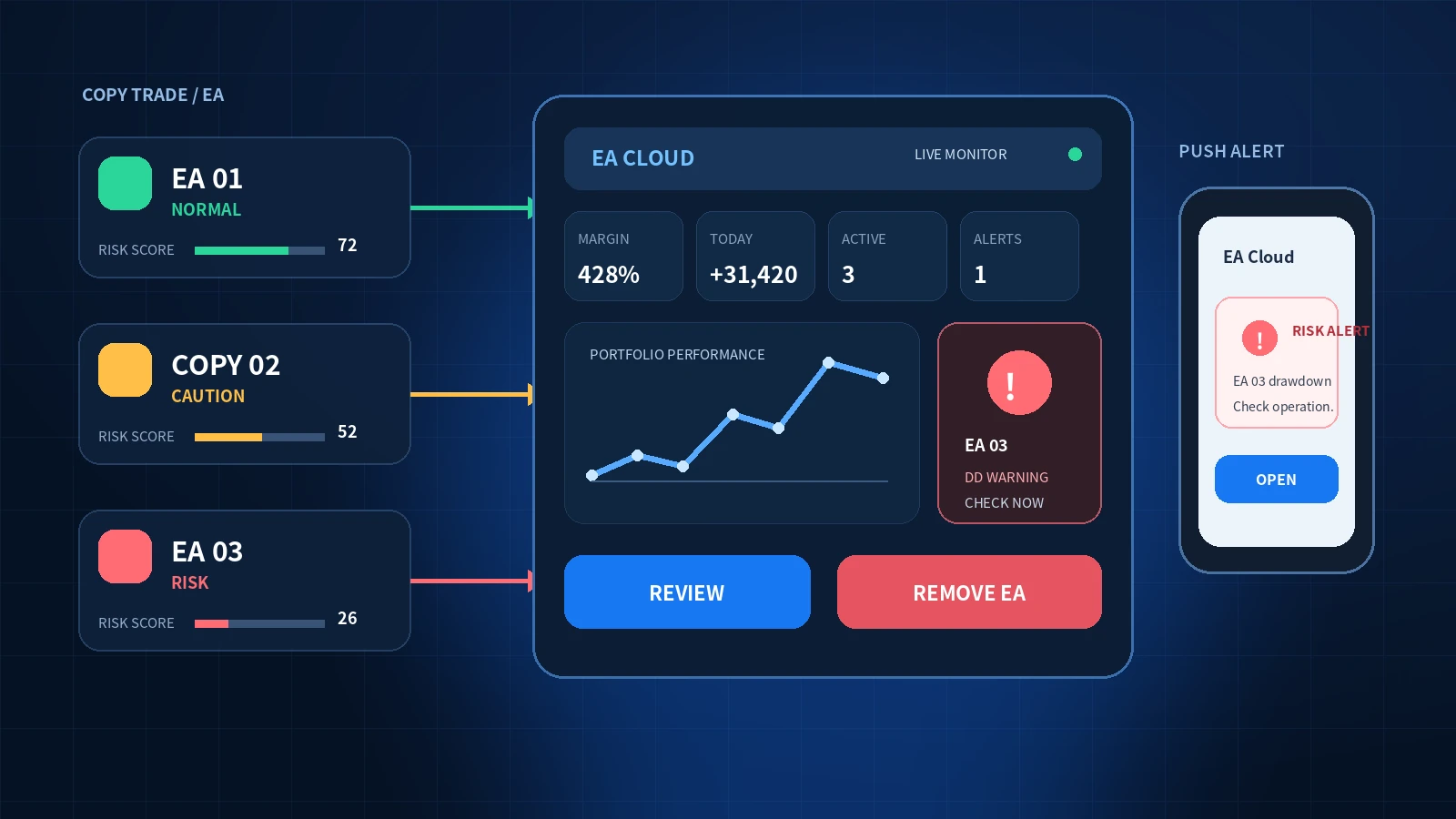
What this guide covers
- Monitor copy trading and EAs at the account, terminal, and strategy levels.
- Connect alerts to predefined review steps and removal conditions.
- Use EA Cloud to review multiple VPS environments and limit the expansion of loss from deteriorating EAs.
The greatest danger in automated trading is not one losing trade. It is allowing a bad condition to continue for days because nobody noticed it. Copy trading and EAs automate execution, but they still require monitoring, alerts, and removal rules.
A system for finding profitable EAs is not enough. A complete operation also needs a way to detect danger and stop a strategy before the loss expands.Core principle of EA Cloud operations
Automated does not mean safely managed
Copy trading and EAs are useful because they automate execution. That does not mean their behavior remains safe after deployment.
An EA with strong historical results can begin losing when the market regime changes. A signal provider may change position size or trade management. A VPS or MT4/MT5 terminal can disconnect while positions remain open.
- Position size or the number of open trades rises unexpectedly
- Floating loss and drawdown expand in a short period
- Margin level falls and available capacity becomes limited
- The VPS, MT4/MT5 terminal, or EA stops
- Consecutive losses move outside the strategy's historical range
- Trading activity increases around major economic events
Cumulative performance may remain positive while recent behavior has already deteriorated. Delaying action because the account is “still profitable” can allow previously earned profit to disappear quickly.
Monitor the account, terminal, and strategy separately
A single number rarely explains the cause of an anomaly. EA Cloud supports an operating model that reviews the portfolio at three levels.
If account drawdown is increasing, not every EA is necessarily performing badly. One EA may be generating most of the loss, or one terminal may be disconnected. Separating the layers allows a targeted response instead of stopping everything.
Connect detection, notification, review, and removal
An alert has little value unless the operating procedure defines what to check and when to act.
| Alert or change | First review | Example response |
|---|---|---|
| Margin level falls rapidly | Floating loss, position count, lot size, and currency concentration | Stop new deployment and remove the responsible EA if required |
| EA or terminal stops | VPS connection, terminal state, recent changes, and open positions | Recover it or move to a safe stopped state for manual review |
| P/L by EA deteriorates | Recent trades, losing streak, drawdown, and historical range | Increase monitoring, reduce size, or remove it |
| Trading activity exceeds expectations | Position count, lot size, symbol, time, and configuration changes | Stop or remove the strategy if behavior is outside the rules |
Do not keep a losing EA simply because other EAs are profitable
In a multi-EA portfolio, strong and weak strategies coexist. If every EA remains active indefinitely, a deteriorating EA can erase the profit produced by the rest.
Protecting profit does not mean guaranteeing a gain. It means identifying a weak strategy earlier and limiting additional loss so that accumulated results are less likely to be given back.
Monitor what is happening in your own account
Public performance from a signal provider is only one part of the picture. Execution price, spread, account size, copying multiplier, and delay can produce different results in your account.
Reported P/L, win rate, follower count, and historical drawdown
Margin, floating loss, lot size, positions, execution difference, and terminal state
Copy trading therefore needs the same operating discipline as an EA: monitor the account and terminal, receive alerts, and keep a practical way to stop the operation.
Use predefined removal rules instead of intuition
Removing an EA after one loss can stop it before its edge has time to appear. Keeping it indefinitely because it “may recover” can allow losses to expand. Define the conditions before live operation begins.
| Metric | Example warning line | Purpose |
|---|---|---|
| Live drawdown | Approaches 70–100% of expected maximum DD | Detect when live behavior leaves the validated range |
| Consecutive losses | Exceeds the historical maximum | Identify possible deterioration rather than ordinary variance |
| Rolling PF or expectancy | Remains below 1.0 after a meaningful sample | Check whether the edge has become negative |
| Positions and lot size | Exceeds configured limits or the normal range | Detect grid, martingale, or configuration anomalies early |
| Terminal or EA stops | Repeated failures after recovery | Recognize an unstable operating environment |
A scalping EA and a long-term trend EA have different trade counts and losing-streak distributions. Build the warning line from backtests and demo operation for that specific EA.
Review multiple VPS instances from a computer or smartphone
EA Cloud lets operators review multiple MT4/MT5 terminals, balance, equity, P/L, and connection state in a browser instead of opening each VPS separately. EAs and SET files that are no longer required can be removed from the selected terminal.
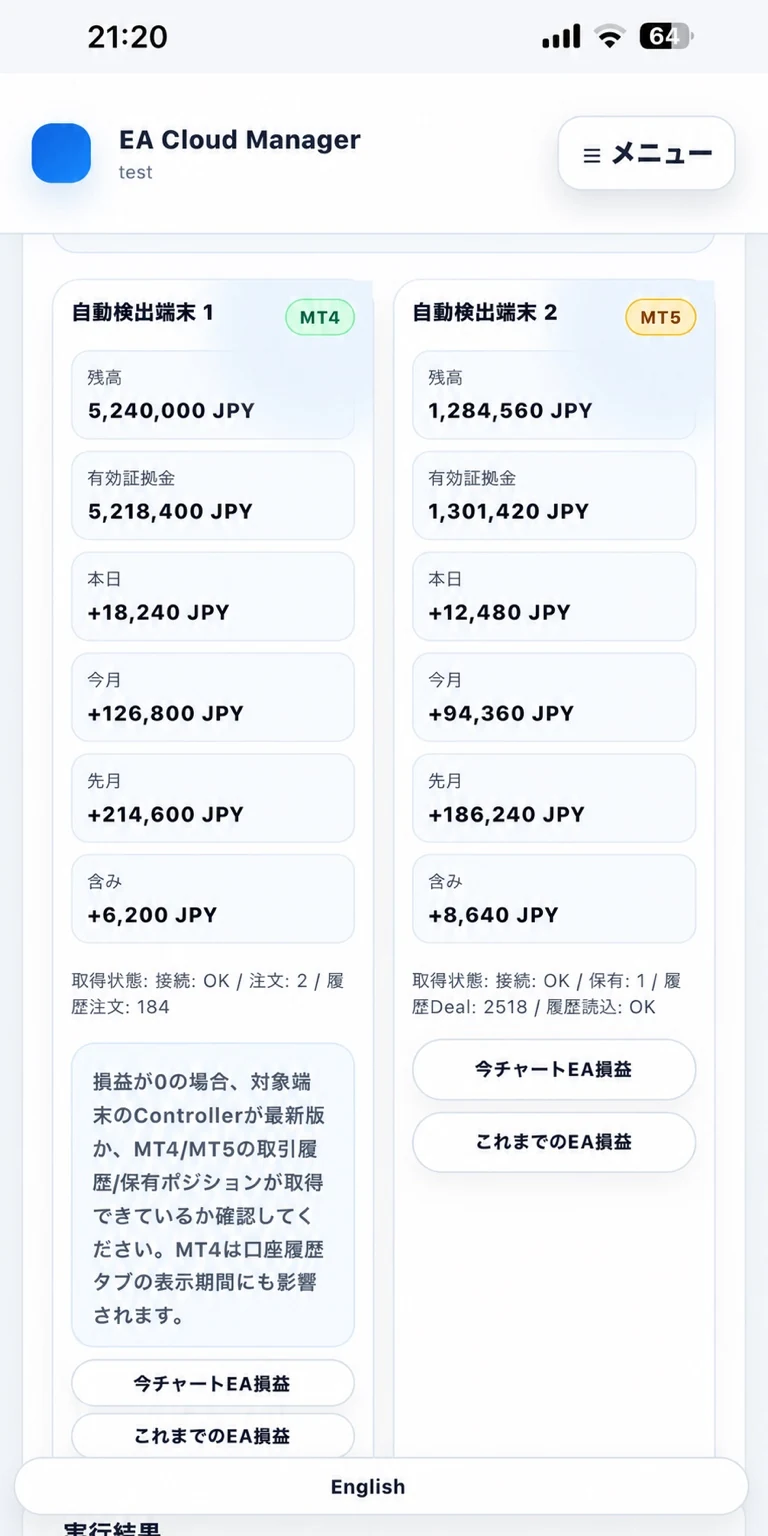
Check balance, equity, daily P/L, and monthly P/L by terminal.
02Drill down to P/L by EASeparate which EA is producing profit or loss.
03Remove an EA from the browserAfter a performance or lifecycle decision, remove the selected EA without opening the VPS desktop.
Replace unattended operation with a simple review cadence
- Critical alerts
- Margin level
- Terminal or EA stops
- Rapid floating loss
- P/L by EA
- Losing streak and DD
- Lot size and positions
- Configuration differences
- Continue, reduce, or remove
- Correlation and currency exposure
- Risk reallocation
- Recovery and backups
EA Cloud does not guarantee that an EA will remain profitable. It provides an operating layer for seeing multiple environments, detecting anomalies earlier, and executing stop or removal decisions more consistently.
Move from unattended automation to managed EA operations
Review multiple VPS and MT4/MT5 terminals, P/L, and alerts in one place, then remove an EA when its performance or behavior no longer meets your rules.
Try EA Cloud ↗This article provides general information about EA and copy-trading operations. Alerts may be delayed, duplicated, or not delivered and must not be the sole risk-control mechanism. EA Cloud does not guarantee profit or prevent loss. Trading and operating decisions remain the user's responsibility.

The FXtradersAI site operator reviews the implementation details, test conditions and cautions before publication.
About the operator →